If you have gone looking for a "Typora free version" lately, you already know the problem. The editor everyone recommended for years is no longer free. That single change is why searches for a free Typora download, an activation code or a serial number keep climbing, and why so many people end up on sketchy sites hunting for a crack.
Here is the good news. You do not need any of that. We build the free Markdown tools at iLoveMarkdown, and after a decade of writing Markdown in half a dozen editors, I can tell you the Typora experience is easy to get for free, legally, without installing anything. This guide covers what happened to Typora, why cracking it is a bad trade, and the free alternatives worth your time.
Key takeaways
- Typora left beta in November 2021 and is now paid software. There is a 15-day trial, then a one-time license of about 14.99 USD for up to three devices.
- Chasing a "free version," a leaked serial number or a crack is risky. Cracked installers are a leading source of malware and the license is easy to break.
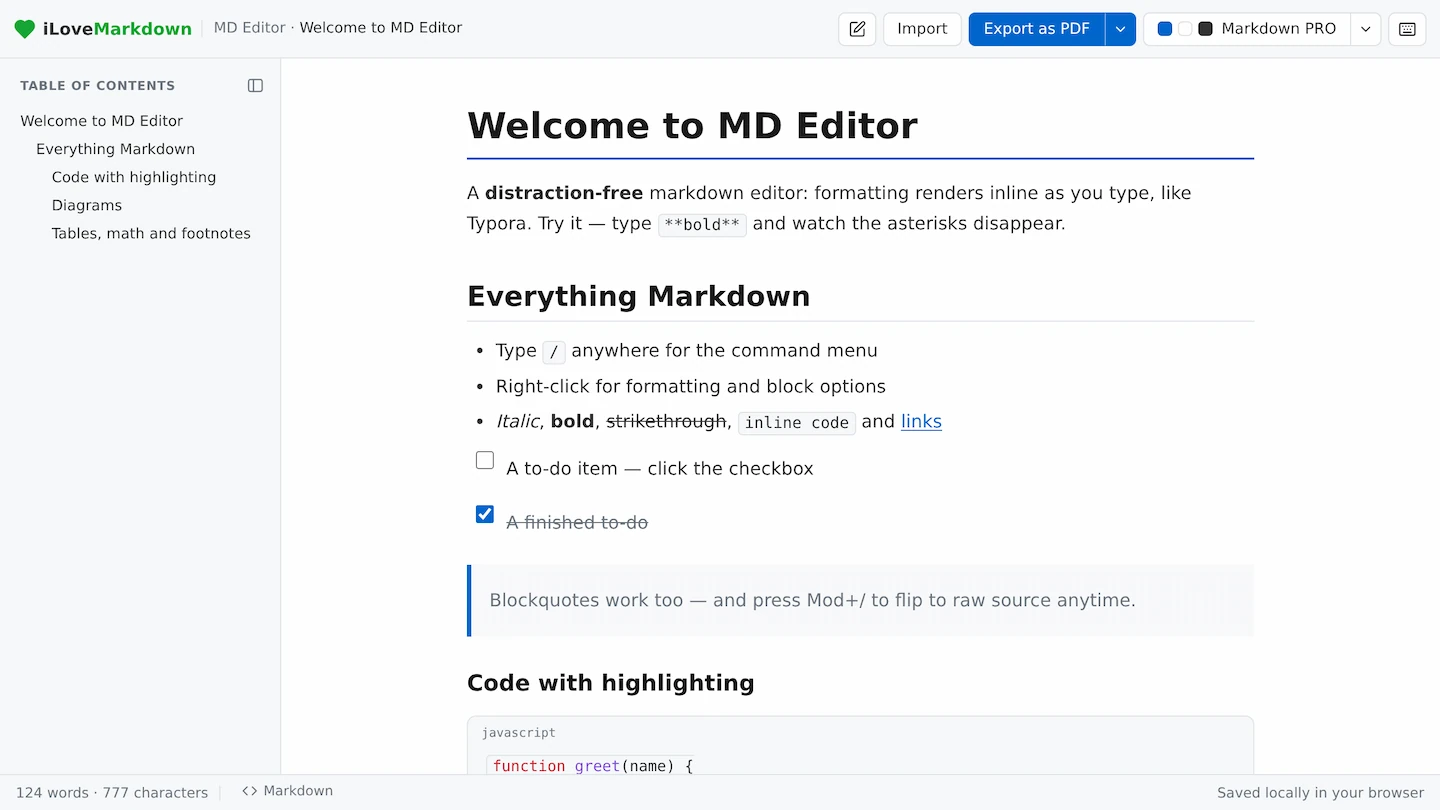
- The fastest free Typora alternative is MD Editor, a browser-based editor that renders Markdown inline as you type, with no install, no signup and no license key.
- Obsidian, Mark Text, Zettlr and VS Code are solid free desktop options, each with a different sweet spot.
- Your
.mdfiles are plain text, so moving off Typora takes seconds and loses nothing.
Is Typora free in 2026?
No. Typora left beta with version 1.0 in November 2021 and became paid software. It offers a 15-day free trial, after which it asks for a one-time license of around 14.99 USD covering up to three devices. There is no free tier of the current release.
For years, all through its long beta, Typora was free. That is why so many blog posts, tutorials and download pages still describe it as a "free Markdown editor." The reputation stuck even after the price did not. When the paid 1.0 arrived, a wave of new searches appeared almost overnight. People looked for a "Typora free version," a way to "activate Typora," a "Typora serial number" and a "Typora activation code." They were not trying to steal anything sophisticated. They just wanted back the free editor they remembered.
If you just want the pricing details, we cover them in full in is Typora free, along with where to download Typora safely and how activation works.
Already bought a Typora license? Keep using it. It is a lovely app and 14.99 USD one time is a fair price. This guide is for people who want a free editor and would rather not pay or pirate to get one.
Why you should not crack Typora
A cracked copy of Typora, a leaked serial number or a "free activation" patch is not worth the risk. Cracked installers are one of the most common ways malware reaches a computer, and using one breaks the license anyway.
Every year the story repeats. Someone searches for free paid software, downloads a patched installer or a keygen, and hands an unknown program full access to their files. Weigh what is actually on the table here:
- Malware. Patched installers and keygens routinely bundle info-stealers, ransomware and crypto miners. You are running an untrusted binary with the same permissions you have.
- No updates or security fixes. A cracked build is frozen and cut off from the safe update channel, so known bugs and holes never get patched.
- It breaks the license. In most places using cracked software is unlawful, and for a 14.99 USD tool the downside is wildly out of proportion.
- It is unnecessary. The free, legal editors below match Typora feature for feature for almost everything a writer does.
If you love Typora's polish, there are only two honest paths. Pay the small one-time fee, or pick one of the genuinely free alternatives below. Both beat gambling your machine to save the price of a sandwich. We go deeper on this in why a Typora crack is a bad idea and how to activate Typora.
The best free Typora alternative: MD Editor
The closest free replacement for Typora is MD Editor, a browser-based Markdown editor from iLoveMarkdown. Like Typora, it renders your formatting inline as you type, with no split preview pane, and it is free with no install, no signup and no license key.
What makes it feel like Typora is the writing experience. You type # Heading and it becomes a heading in place. Bold, lists, tables, blockquotes and code blocks all render inline the moment you finish them, so the document you edit looks like the document you will publish. A slash menu inserts blocks without breaking your flow, and you can drop into a raw source view whenever you want to see the plain Markdown.
It also covers the parts most editors skip. Fenced code blocks get syntax highlighting, math renders with KaTeX, Mermaid diagrams draw themselves, and task lists give you real checkboxes. Because it runs in your browser, nothing is uploaded and nothing is installed, which means it works the same on a Mac, a Windows PC, a Linux box or a locked-down Chromebook where you could never install Typora at all.
When a document is done, you stay inside the same toolkit. Export a clean PDF straight from your Markdown, drop text into the live preview to sanity-check rendering, or run it through the validator to catch broken lists and tables before you ship.
Write Markdown free, right now
MD Editor renders your formatting inline as you type, just like Typora. No install, no signup, no license key, and nothing leaves your browser.
Open MD Editor →6 free Typora alternatives compared
MD Editor is the pick if you mostly want to write. But the "best" free editor depends on the job, so here is an honest look at six options and where each one shines. Want the wider field including paid apps? See our top 10 Typora alternatives.
| Editor | Type | Inline live preview | Install needed | Best for |
|---|---|---|---|---|
| MD Editor | Browser | Yes | No | Typora-style writing with zero setup |
| Obsidian | Desktop | Live Preview mode | Yes | Linked notes and knowledge bases |
| Mark Text | Desktop | Yes | Yes | Open-source desktop Typora clone |
| Zettlr | Desktop | Partial | Yes | Academic writing and citations |
| StackEdit | Browser | Split preview | No | Cloud sync workflows |
| VS Code | Desktop | Split preview | Yes | Developers already living in an editor |
MD Editor is the most direct Typora stand-in. It is the only option here that gives you true inline rendering with no install at all, which is exactly the gap people feel when Typora asks for a license. Open a tab and start writing.
Obsidian is free for personal use and superb if your notes link to each other. Its Live Preview mode renders inline much like Typora, and it stores everything as local Markdown files. The trade-off is that it is a full knowledge-base app to install and learn, which is more than you need if you just want to write a document.
Mark Text is the closest open-source desktop clone of Typora, with the same clean inline editing and a free, no-strings license. Worth knowing that active development has slowed in recent years, so updates are infrequent.
Zettlr is a free, open-source editor aimed at researchers and students. Citations, footnotes and export to academic formats are its strength. Its preview is more source-forward than Typora's fully inline feel, so it suits long structured writing more than quick notes.
StackEdit runs in the browser like MD Editor and syncs to Google Drive and Dropbox, which is handy for cloud workflows. It uses a classic side-by-side split preview rather than inline rendering, so it looks and feels less like Typora.
VS Code with a Markdown extension is the natural choice if you already write code there. It is free and endlessly configurable, but its preview lives in a separate pane, so it is a code editor that shows Markdown rather than a writing-first app like Typora.
How to switch from Typora
Switching away from Typora is painless because Markdown is plain text. Your .md files open in any editor with no conversion and nothing is trapped in a proprietary format.
The whole move takes a couple of minutes:
- Find your files. Typora saves standard
.mddocuments wherever you told it to. There is nothing to export first. - Open your new editor. For MD Editor, open the page and paste your Markdown or open a file. There is no import wizard and no account to create.
- Bring your look across if you want it. Most editors ship clean light and dark themes out of the box, so you can match Typora's minimal feel in a click.
- Keep your export habit. Where Typora exported PDFs, MD Editor does the same. Follow our guide on converting Markdown to PDF and you are set.
What you keep and what changes
You keep the parts that made Typora worth using. Clean inline rendering, standard CommonMark and GitHub Flavored Markdown, tables, code blocks, math and diagrams all come along, because they are features of Markdown itself, not of one app.
What changes is mostly the shell around the writing. A browser-based editor updates itself, keeps your text on your own machine, and runs anywhere you can open a tab, including work laptops and Chromebooks where installing desktop software is off the table. For most writers that is not a downside at all. It is the reason to switch. If you are still new to the syntax, our complete Markdown guide covers every element with copy-paste examples.
Frequently asked questions
Is Typora still free?
No. It was free all through its long beta, but version 1.0 in November 2021 made it paid. There is a 15-day trial, then a one-time license of about 14.99 USD for up to three devices.
How do I activate Typora for free?
You cannot activate the paid version without a valid license, and "free activation" patches, keygens and leaked serials are unsafe and break the license. The free path is to use a genuinely free editor like MD Editor instead of paying or pirating.
What is the best free alternative to Typora?
For a Typora-style inline writing experience with zero setup, MD Editor is the closest match. For a linked knowledge base, Obsidian is excellent, and Mark Text is the nearest open-source desktop clone.
Is it safe to download a cracked version of Typora?
No. Cracked installers and keygens are a leading source of malware, and a cracked build gets no security updates. Do not risk your machine to avoid a 14.99 USD fee when free, legal editors exist.
Does MD Editor cost anything?
No. It is free with no signup and no license key. It runs in your browser and nothing is uploaded to a server.
Can I keep using my existing .md files?
Yes. Typora saves standard Markdown, so your .md files open in any editor with no conversion.
Skip the license key
Get the Typora writing experience for free. Open MD Editor and start typing Markdown that renders as you go.
Try MD Editor free →Keep reading: new to the syntax? Start with the ultimate Markdown guide, or learn how to convert Markdown to PDF for free.